The Executive Brief
Listen to audio executive briefings.
Overview & Core Benefits
Learn how to view the widget sandbox and interact with executive briefs.
Step-by-Step Walkthrough Guide
Follow these step-by-step instructions to master the The Executive Brief workflow on the CareerCove platform.
Step 1: Navigate to Resume Dashboard
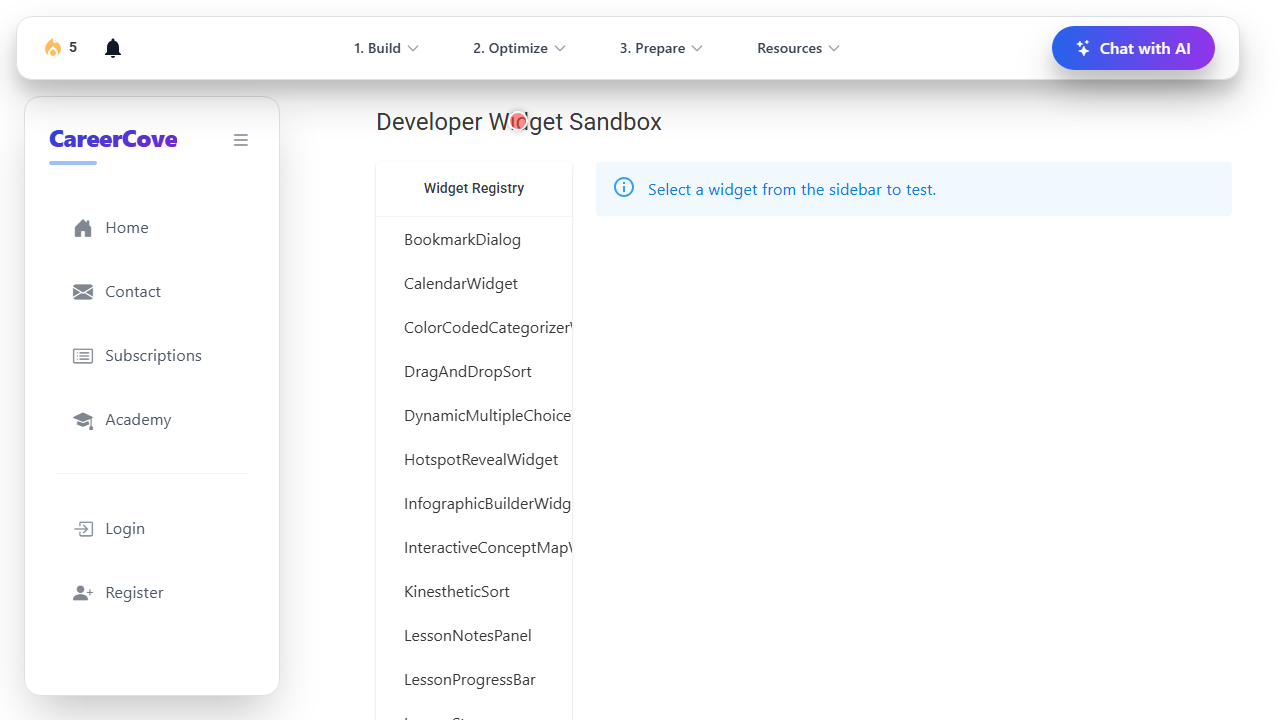
Navigate to the developer widget sandbox to view and test custom interactive learning widgets.
Purpose: Open the widget sandbox page.
Benefit: Allows previewing custom lesson widgets in an isolated workspace.
Outcome: The developer widget sandbox page loads showing the widget registry.
Step 2: Accessing Executive Brief Section
Select the Executive Brief widget from the sidebar registry to render it inside the workspace.
Purpose: Locate and click the TheExecutiveBriefWidget navigation link.
Benefit: Renders the specialized audio briefing widget component.
Outcome: The Executive Brief widget loads inside the preview area.

Step 3: Generating Executive Brief Summary
Trigger the auditory play button to listen to the AI-generated brief of the business context.
Purpose: Play the executive voicemail briefing statement.
Benefit: Provides a dynamic, multi-modal summary of key requirements.
Outcome: The audio playback is activated, and progress bar shows progress.

Step 4: Refining Tone of Executive Summary
Review the available choices to prioritize the executive actions.
Purpose: Inspect the answer option buttons.
Benefit: Enhances decision-making skills in professional workflows.
Outcome: Options are highlighted for user selection.

Step 5: Exporting Executive Summary View
Choose the correct primary action response to complete the task submission.
Purpose: Click the target response option button.
Benefit: Submits response and completes verification of active learning unit.
Outcome: Option is selected, displaying success indicator states.

See It In Action
Maximising Your Journey
The Executive Brief widget compiles a concise summary of your applications and learning goals, giving you an instant status report at a glance.
Ready to apply this guide to your own career?
Register an account or sign in to save your progress, build and optimize your resume, and access advanced AI career tools.
Recommended Pathway Steps