Auditing Resume Strength & Missing Data
Identify resume completeness issues.
Overview & Core Benefits
Locate and review incomplete sections or draft-status details on your resume dashboard to ensure completeness before applying.
Step-by-Step Walkthrough Guide
Follow these step-by-step instructions to master the Auditing Resume Strength & Missing Data workflow on the CareerCove platform.
Step 1: Open Your Resume Dashboard
Navigate to the Resume Dashboard. The dashboard displays a summary of your profile's completeness.
Purpose: To check the completeness status of your entire resume at a glance.
Benefit: Highlights exactly which sections need attention before you export or apply to jobs.
Outcome: The dashboard page loads, displaying color-coded status badges on each resume section card.
Step 2: Check for Missing Data Indicators
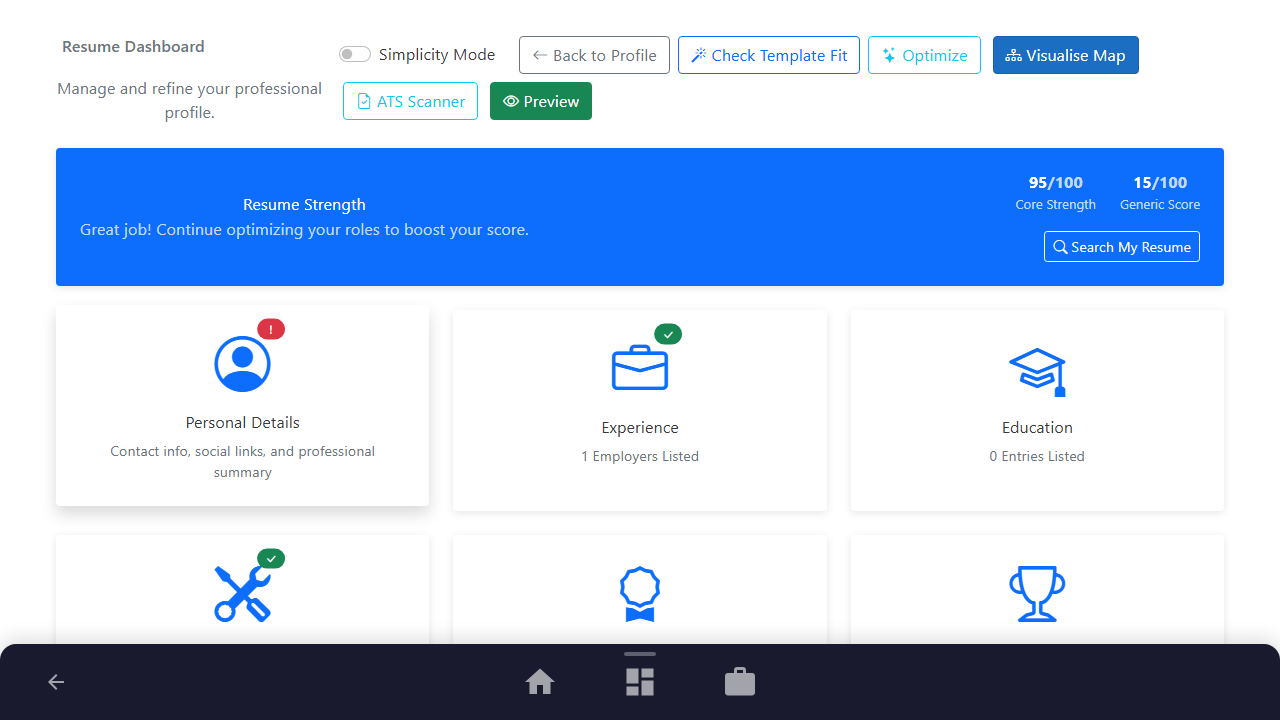
Scan the section cards (like Personal Details, Experience, Education, Skills) for red exclamation badges.
Purpose: To identify which sections have incomplete information or are marked as drafts.
Benefit: Focuses your attention on weak or incomplete parts of your profile.
Outcome: Red action-required badges are highlighted on the dashboard cards.
Step 3: Inspect Section Details for Action Items
Review individual card descriptions and completeness status to determine what data is missing (e.g. contact details or experience descriptions).
Purpose: To pinpoint the exact missing details.
Benefit: Gives you clear instructions on what needs to be fixed.
Outcome: You determine that the 'Personal Details' card has an action required badge.
See It In Action
Maximising Your Journey
Reviewing completeness indicators and warning alerts highlights missing contact details or empty sections that would otherwise hurt your score.
Ready to apply this guide to your own career?
Register an account or sign in to save your progress, build and optimize your resume, and access advanced AI career tools.
Recommended Pathway Steps